VAST.File.ISO Library
The VAST.File.ISO library provides comprehensive support for the ISO Base Media File Format (ISO/IEC 14496-12), commonly known as MP4. It enables parsing, muxing, demuxing, and streaming of MP4 files with support for fragmented MP4 (fMP4), DASH segments, and LL-HLS compatibility.
Overview
| Feature | Description |
|---|---|
| MP4 Parsing | Read and parse MP4/MOV container files |
| MP4 Muxing | Create MP4 files with multiple tracks |
| Fragmented MP4 | Support for fMP4 streaming segments |
| Live Source | HTTP-based live fMP4 streaming |
| Progressive Write | Fail-safe recording with metadata at start |
| File Rotation | Chunked recording with automatic rotation |
Requirements
- .NET: .NET 6.0 or later
- Dependencies: VAST.Common
Supported Container Formats
| Format | Brand | Description |
|---|---|---|
| MP4 | mp41, mp42 | MPEG-4 Part 14 |
| ISO Base Media | isom, iso2-iso9 | ISO/IEC 14496-12 |
| QuickTime | qt | Apple MOV format |
| Fragmented MP4 | - | DASH/HLS segments |
Supported Codecs
Video Codecs
| Codec | Box Type | Description |
|---|---|---|
| H.264/AVC | avc1, avcC | Advanced Video Coding |
| H.265/HEVC | hev1, hvc1, hvcC | High Efficiency Video Coding |
| MPEG-4 Visual | mp4v, esds | MPEG-4 Part 2 |
| MPEG-2 Video | mp4v, esds | MPEG-2 Part 2 |
Audio Codecs
| Codec | Box Type | Description |
|---|---|---|
| AAC | mp4a, esds | Advanced Audio Coding |
| MP3 | mp4a, esds | MPEG Audio Layer III |
| MP2 | mp4a, esds | MPEG Audio Layer II |
| MP1 | mp4a, esds | MPEG Audio Layer I |
Track Types
| Type | Handler | Description |
|---|---|---|
| Video | vide | Video tracks |
| Audio | soun | Audio tracks |
| Subtitle | subt | Subtitle tracks |
| Text | text | Text tracks |
| Metadata | meta | Metadata tracks |
| Hint | hint | RTP hint tracks |
| Timecode | tmcd | Timecode tracks |
Reading MP4 Files
IsoSource
The IsoSource class provides interactive playback of MP4 files with seeking, pause/resume, and variable playback rate.
var source = new VAST.File.ISO.IsoSource();
source.Uri = "video.mp4";

source.NewStream += (sender, e) =>
{
    Console.WriteLine($"Track {e.StreamIndex}: {e.MediaType}");
};

source.NewSample += (sender, e) =>
{
    // Process decoded sample
    ProcessSample(e.Sample);
};

source.StateChanged += (sender, state) =>
{
    if (state == MediaState.Opened)
    {
        source.Start();
    }
};

source.Open();
Reading from Stream
Read MP4 data from a custom stream instead of a file:
var fileStream = File.OpenRead("video.mp4");

var source = new VAST.File.ISO.IsoSource();
source.Stream = fileStream;

source.StateChanged += (sender, state) =>
{
    if (state == MediaState.Opened)
    {
        source.Start();
    }
};

source.Open();
Playback Features
| Feature | Support |
|---|---|
| Seeking | Timestamp-based positioning |
| Pause/Resume | Full support |
| Playback Rate | Variable speed playback |
| Looping | Continuous playback |
| Multi-track | Video, audio, subtitles |
Seeking
// Seek to 30 seconds
source.Position = TimeSpan.FromSeconds(30);
Playback Rate
// 2x speed playback
source.PlaybackRate = 2.0f;
Supported playback rate ranges:
| Rate | Description |
|---|---|
| double.MinValue | As fast as possible in backward direction (no pacing) |
| -32 to -1 | Rewind (backward playback) |
| 0 to 1 (exclusive) | Slow motion |
| 1 | Normal speed |
| 1 to 32 | Fast forward |
| double.MaxValue | As fast as possible (no pacing) |
Writing MP4 Files
IsoSink
The IsoSink class creates MP4 files with multiple tracks and supports file rotation for long recordings.
var sink = new VAST.File.ISO.IsoSink();
sink.Uri = "output.mp4";

// Add video track
sink.AddStream(0, videoMediaType);

// Add audio track
sink.AddStream(1, audioMediaType);

sink.Open();
sink.Start();

// Write samples
sink.PushMedia(0, videoSample);
sink.PushMedia(1, audioSample);

// Finish recording
sink.Stop();
Writing Modes
| Mode | Description |
|---|---|
| Standard | Metadata written at end of file |
| Progressive | Metadata at start, updated continuously |
| Fragmented | fMP4 segments for streaming |
Progressive Write Mode
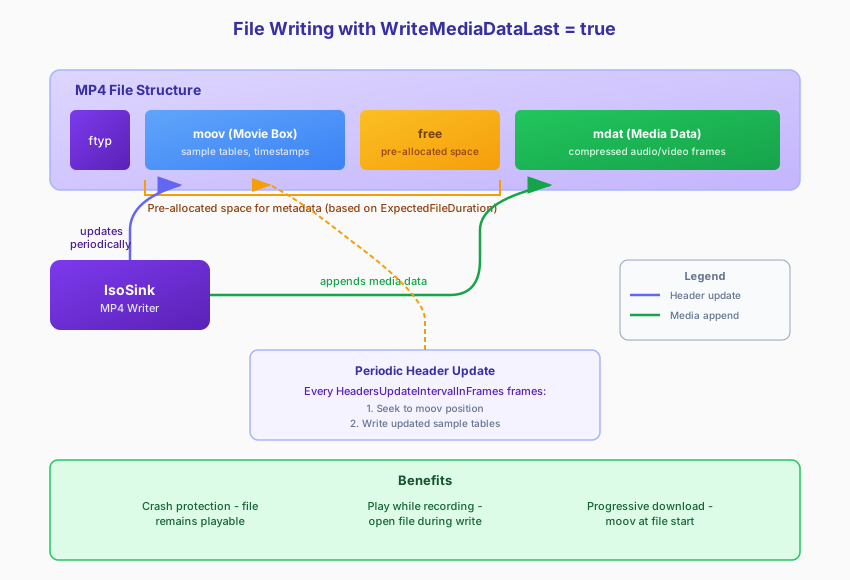
Progressive mode writes metadata at the beginning of the file and updates it continuously, ensuring the file remains playable even if the application crashes.
var parameters = new VAST.File.ISO.ParsingParameters
{
    WriteMediaDataLast = true,
};

var sink = new VAST.File.ISO.IsoSink(parameters);
sink.Uri = "output.mp4";
Use ExpectedFileDuration to reserve sufficient space at the beginning of the file for metadata. This prevents the need to relocate media data if the metadata grows beyond the initially allocated space.
Use HeadersUpdateIntervalInFrames to control how frequently metadata is updated to disk. Increasing this interval reduces disk I/O and CPU load during recording.
Changeable Parameter Sets
Use PreserveNals to store parameter sets (SPS/PPS for H.264, VPS/SPS/PPS for H.265) inline with media data. By default, parameter sets are stored only in the sample description box. Enabling this option keeps the file playable when parameter sets change mid-stream.
File Rotation
For long recordings, automatic file rotation creates new files at specified intervals.
var sink = new VAST.File.ISO.IsoSink();
sink.RotationPeriod = 3600; // Rotate every hour (in seconds)

int fileNumber = 0;
sink.NextUri = () => $"recording_{fileNumber++:D4}.mp4";

sink.UriRotated += (sender, e) =>
{
    Console.WriteLine($"New file: {e.Uri}");
};
Writing to Stream
Write MP4 data to a custom stream instead of a file:
var memoryStream = new MemoryStream();

var sink = new VAST.File.ISO.IsoSink();
sink.Stream = memoryStream;

sink.AddStream(0, videoMediaType);

sink.StateChanged += (sender, state) =>
{
    if (state == MediaState.Opened)
    {
        sink.Start();
    }
};

sink.Open();

...

sink.PushMedia(0, videoSample);

sink.Stop();

// Access the MP4 data
byte[] mp4Data = memoryStream.ToArray();
Delayed Start
Use delayed start when the first media sample may arrive after a significant delay:
sink.Start(delayedStart: true);

// File will be created/recreated when first sample arrives
// Empty file is automatically deleted if no samples received
Fragmented MP4
Fragmented MP4 (fMP4) splits media into independent fragments, enabling streaming and adaptive bitrate delivery.
Structure
fMP4 File
├── ftyp (File Type)
├── moov (Movie Header - no samples)
│   ├── mvhd (Movie Header)
│   ├── mvex (Movie Extends)
│   │   └── trex (Track Extends)
│   └── trak (Track - sample descriptions only)
├── moof (Movie Fragment 1)
│   ├── mfhd (Fragment Header)
│   └── traf (Track Fragment)
│       ├── tfhd (Track Fragment Header)
│       ├── tfdt (Decode Time)
│       └── trun (Track Run)
├── mdat (Media Data 1)
├── moof (Movie Fragment 2)
├── mdat (Media Data 2)
└── ... (more fragments)
Creating Fragmented MP4
var parameters = new VAST.File.ISO.ParsingParameters
{
    UseSegments = true,
};

var sink = new VAST.File.ISO.IsoSink();
sink.Parameters = parameters;
Streaming Compatibility
| Mode | Parameter | Description |
|---|---|---|
| DASH | DashCompatible | MPEG-DASH segment format |
| LL-HLS | LlHlsCompatible | Low-Latency HLS format |
Live HTTP Source
The IsoLiveHttpSource class streams fragmented MP4 from HTTP sources in real-time.
var source = new VAST.File.ISO.IsoLiveHttpSource();
source.Uri = "http://server/live/stream.mp4";

source.NewStream += (sender, e) =>
{
    Console.WriteLine($"Stream: {e.MediaType}");
};

source.NewSample += (sender, e) =>
{
    // Process live sample
    ProcessSample(e.Sample);
};

source.StateChanged += (sender, state) =>
{
    if (state == MediaState.Opened)
    {
        source.Start();
    }
};

source.Open();
Parser Configuration
Parsing Parameters
Configure parsing behavior using ParsingParameters:
| Parameter | Description |
|---|---|
| PreserveNals | Preserve all NAL units, including parameter sets, when written to a file |
| UseSegments | Enable fragmented MP4 mode |
| WriteMediaDataLast | Progressive write mode |
| MinimalFreeDiskSpace | Minimum free disk space required before stopping recording |
| MediaStartupMode | Controls when media writing begins (e.g., wait for keyframe) |
Codec Conversion
The parser can automatically convert bitstream representation:
| Conversion | Description |
|---|---|
| AVC → Annex B | H.264 length-prefixed to start codes |
| HEVC → Annex B | H.265 length-prefixed to start codes |
| Raw AAC → ADTS | Add ADTS headers to AAC frames |
Large File Support
The library supports files larger than 4GB using:
- 64-bit box sizes (extended size field)
- 64-bit chunk offsets (co64 box)
Metadata Caching
The library supports caching file metadata (including headers, sample indices, and timing information) in memory. When reopening a cached file, it opens instantly without reading and parsing metadata from disk again.
This is useful for VOD scenarios where multiple clients access the same file, avoiding redundant metadata parsing overhead.
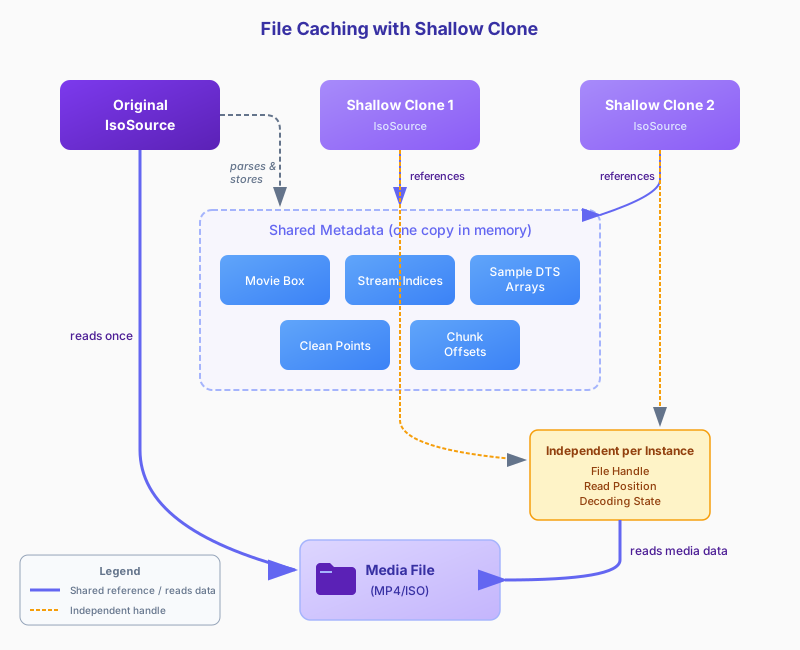
See VAST.File Library for the caching class implementation.
Monitor Mode
As an extension of metadata caching, the file reader supports a monitor mode for reading files that are actively being written. If a source file is growing (e.g., during recording), you can simultaneously write to the file and use it as a VOD source. The reader in monitor mode periodically updates the cached metadata and propagates changes to all dependent readers.
Such growing file sources can be used for Event publishing points.
Troubleshooting
Common Issues
| Issue | Cause | Solution |
|---|---|---|
| File not playable | Metadata at end, incomplete write | Use progressive write mode |
| Seeking fails | No sync samples | Ensure keyframes are marked |
| Large file fails | 32-bit offsets | Library auto-uses 64-bit offsets |
| Playback stutters | Fragment too large | Reduce fragment duration |
| Audio sync issues | Missing ctts | Ensure composition offsets present |
See Also
- Supported Platforms - Platform compatibility matrix
- VAST.Common Library - Core media types and interfaces
- VAST.DASH Library - DASH streaming with fMP4
- VAST.File Library - File source with metadata caching
- VAST.HLS Library - HLS streaming